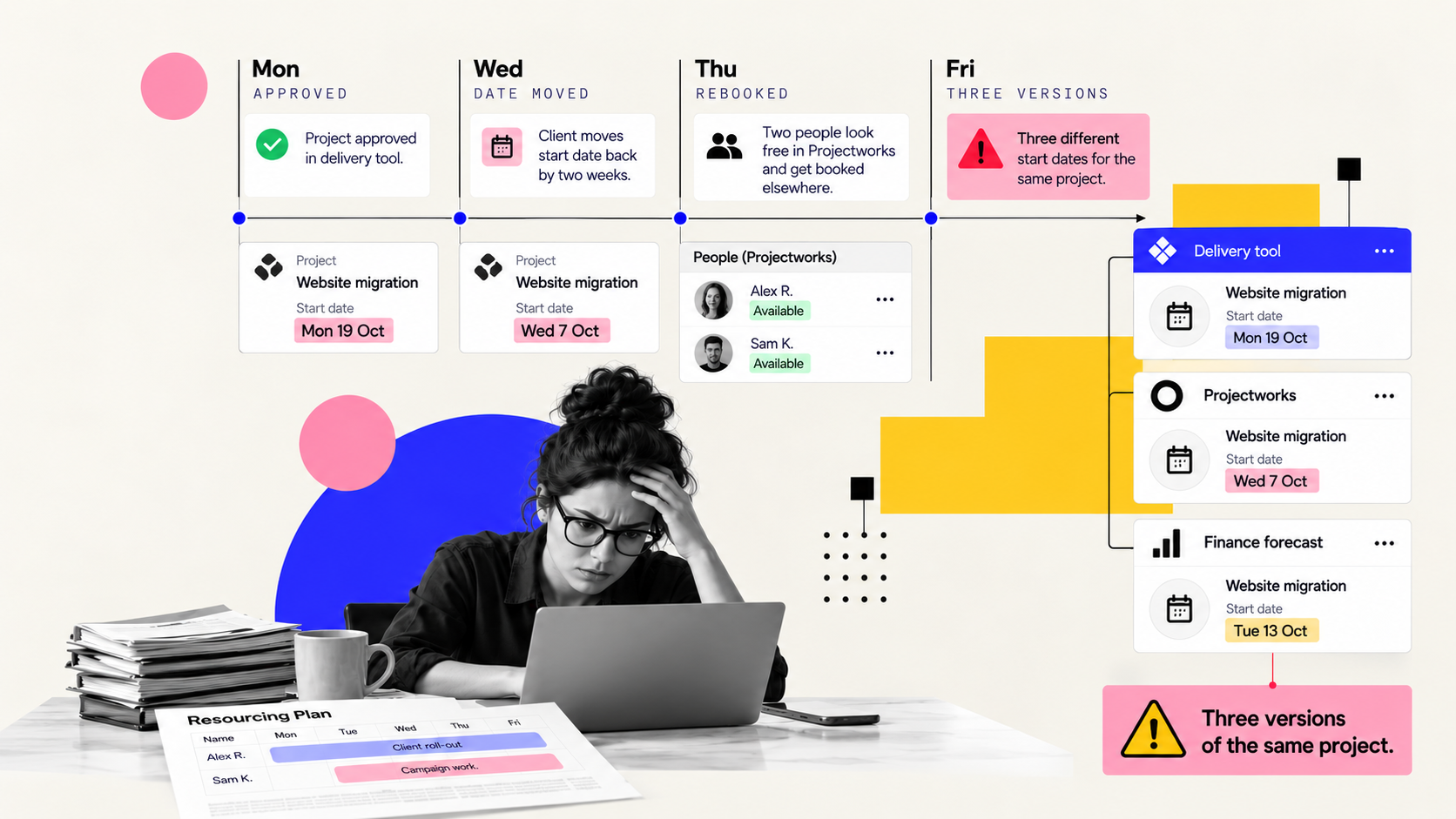
It's 4pm on a Friday. Your project manager has the delivery tool open in one tab, Projectworks in another and a spreadsheet in a third, copying dates, budgets and hours across manually.
Projectworks now integrates with any project management tool, and it goes further than that spreadsheet can. Whichever tool your team delivers in, connecting it to Projectworks will save you time and aggravation.
How one delayed date breaks two systems in a week Take a fairly standard week. On Monday a new client project is approved in your delivery tool. The project manager means to set it up in Projectworks, but there's a kickoff to prepare, so it waits until Wednesday.
On Wednesday the client pushes the start date back two weeks. The delivery tool gets updated, because that's where the team works. Projectworks still has the original date.
On Thursday your resource manager checks capacity in Projectworks, sees two people free in a fortnight, and books them onto something else. Finance, meanwhile, forecasts that project's revenue in the wrong month.
By Friday you have three versions of the same project. The person reconciling them is the one who should be running delivery.
Why asking your team to update both systems doesn't work The usual response is to remind the project managers, add a checklist, make the Friday reconciliation a standing task.
That fails for a structural reason. Two systems each hold their own copy of the same facts (the start date, the budget, the people booked) and nothing tells either system which copy is correct. Every manual update is a chance to miss one, and the misses compound across every project you run.
The other response is to hunt for one tool that does everything, and that rarely works. Delivery tools are flexible and easy for teams to pick up, but they were never designed to carry utilisation, capacity planning, time and expenses or margin reporting. Force them to, and you get a delivery tool nobody wants to use and numbers nobody trusts.
We're a Platinum Partner for both monday. com and Projectworks, and we run mutherboard's own operations on them, so we've felt this gap personally.
Three ways Projectworks connects to a project management toolWhatever project management platform you use, Projectworks can plug in underneath as the resourcing and financial layer. Today that happens through three routes, and they carry very different amounts of data.
Full project sync, starting with monday. com. When a project is requested and approved in monday.com, a matching project is created in Projectworks with details such as start date, budget and time codes.
Change a date in monday.com and Projectworks moves the pencilled resourcing to match. Time logged in monday.com flows across with billable and non-billable hours kept separate.
Time sync from Jira or Azure DevOps. With the Jira integration, people log time to their Projectworks timesheet from inside the ticket, so hours are entered once.
Tickets can link to existing time codes or create new ones.
Your own build, through Zapier or the API. For every other tool, Projectworks offers a Zapier integration and an API connection. A Zap can turn new Office 365 calendar events into resourcing hours.
The same pattern works from a project tool's triggers, or through the API with an automation platform such as Make.
Why connecting the systems won't fix messy data An integration automates the connection between two systems. If your delivery tool calls a project one thing and your time codes call it another, the integration will carry that mismatch across faithfully, every time.
Four things to do before you connect any project management tool
- Write down which system owns each field. List the fields that will cross over: project name, client, dates, budget, time codes and assigned people.
- Name the event that starts the sync, and who can trigger it. In monday.com it's the approved status, which makes that status a financial trigger. In Jira or DevOps it's the mapping of which projects can log time where. In a Zapier build it's whatever trigger you pick.
- Match your task types to your time codes. Put the task or phase types from your delivery tool next to your Projectworks time codes.
- Test away from your live numbers. Use a sandbox project or environment, then delete the test data before anyone reports on it, because dummy data left behind by integration testing is an easy way to make a margin report lie.
Once it's live, check it once a week. Open the capacity view and look at committed time: under 75% is green, 75 to 90% is amber, over 90% is red. Anything red, and anything unrealistic like an 80-hour week, gets flagged.
The Friday spreadsheet disappears once you've decided which system owns each field, and after that the integration keeps both systems in line.